PocketChef
This project was completed as a personal project as part of the Google UX Design Certificate. PocketChef explores how thoughtful ingredient management and guided learning can empower people, especially students and young professionals, to cook healthier meals at home without added stress, waste, or cost.
Team:
1 UX Designers
& Researcher
(Me)
Skills:
UX Research,
Wireframing,
Competitive
Analysis,
Prototyping,
UX and Visual
Design,
Accessibility
Design
Deliverables:
Key Research
Insights,
Wireframes,
High-Fidelity
Mockups,
Functional
Prototype
Timeline:
Google UX
Certificate
(2 months)
But, how did I figure this out?
The Main Problem
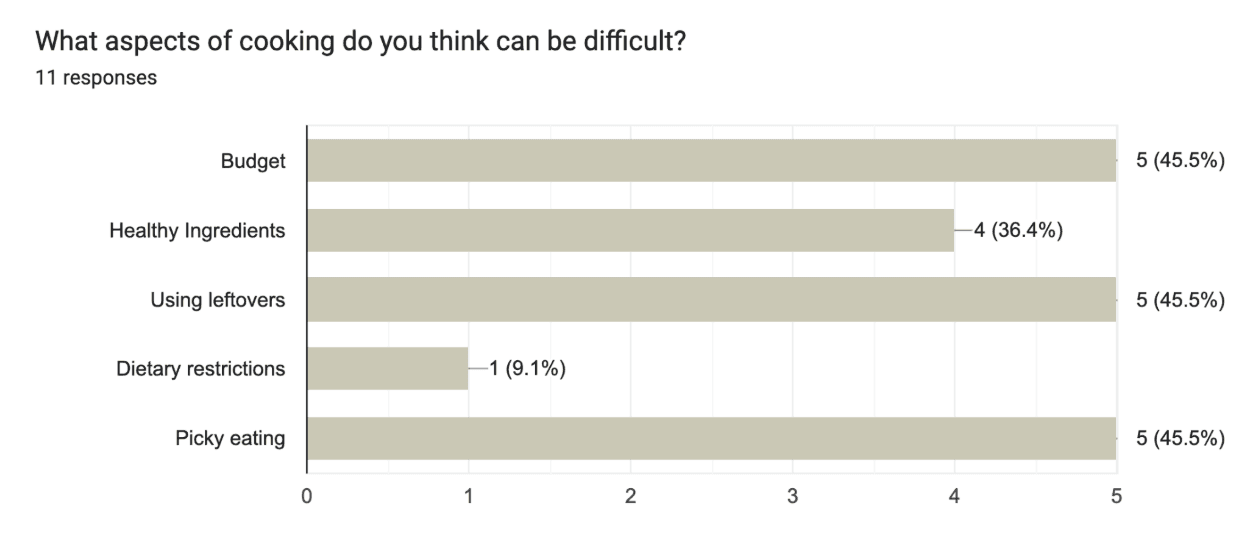
Many users, especially students and young professionals, want to eat healthier but struggle to follow through. From my research, three major barriers emerged:
Healthy cooking feels time-consuming and complex
Fresh ingredients often go unused and wasted
Budget constraints make healthy choices feel inaccessible
Despite good intentions, users lack tools that help them cook confidently with the ingredients they already have.
01 - Research
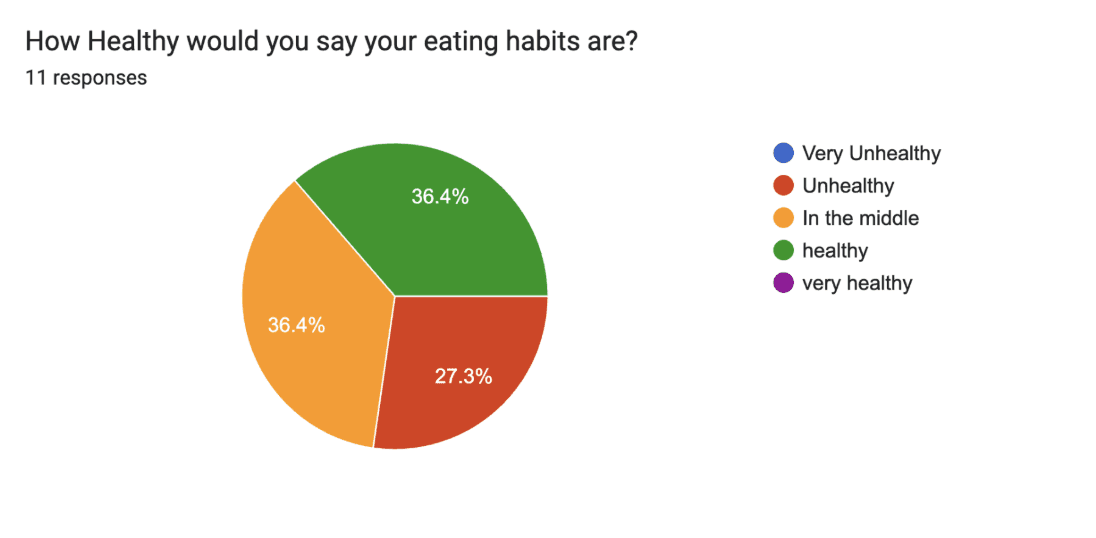
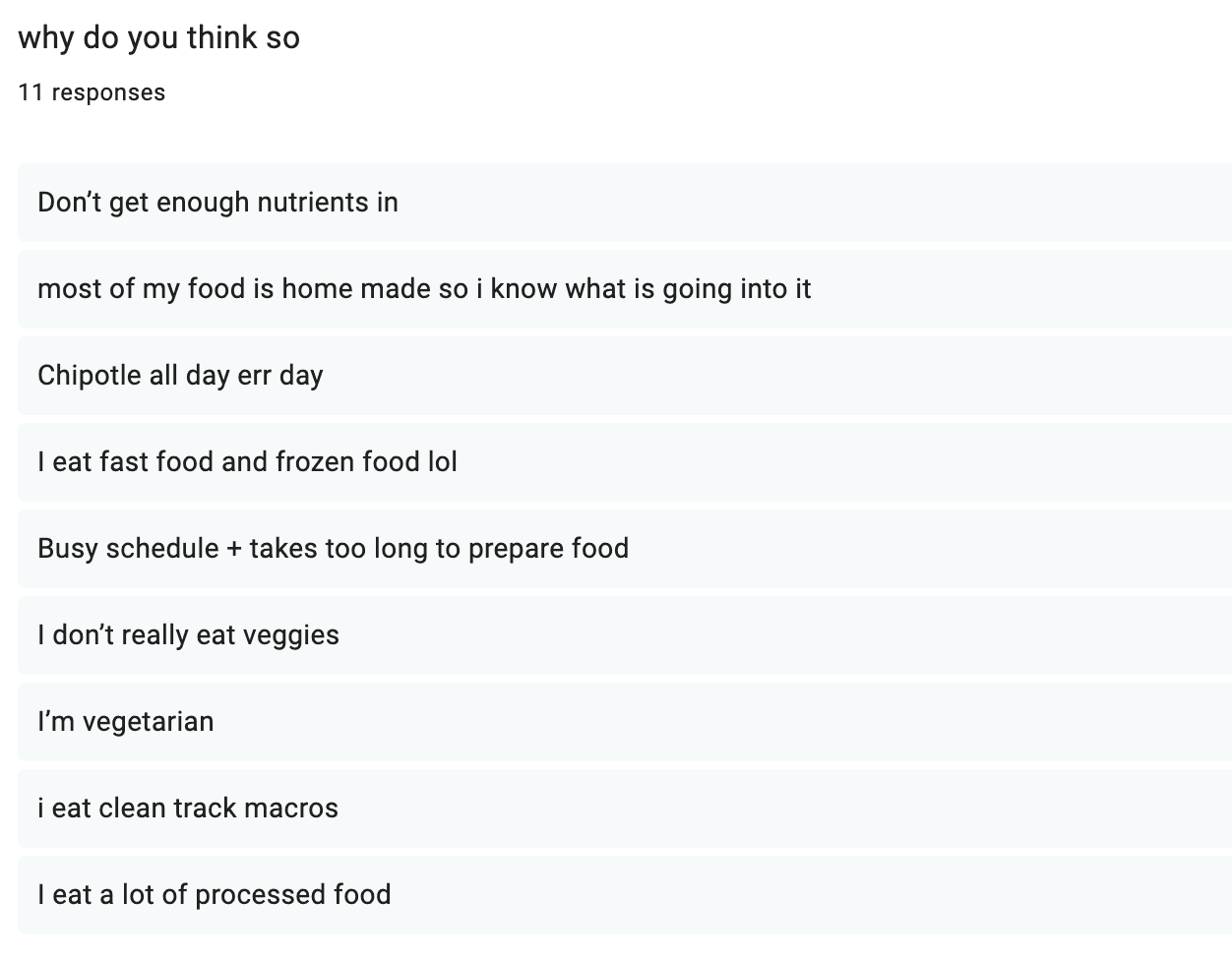
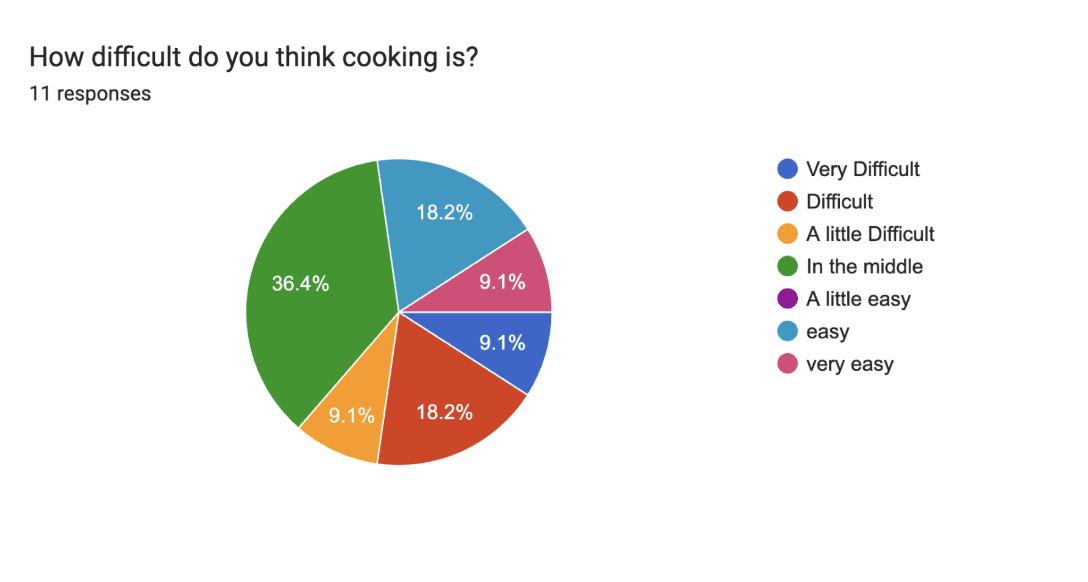
To better understand user behaviors and pain points, I conducted primary research through a Google Forms survey with 11 participants.
User Research 🧐🧐
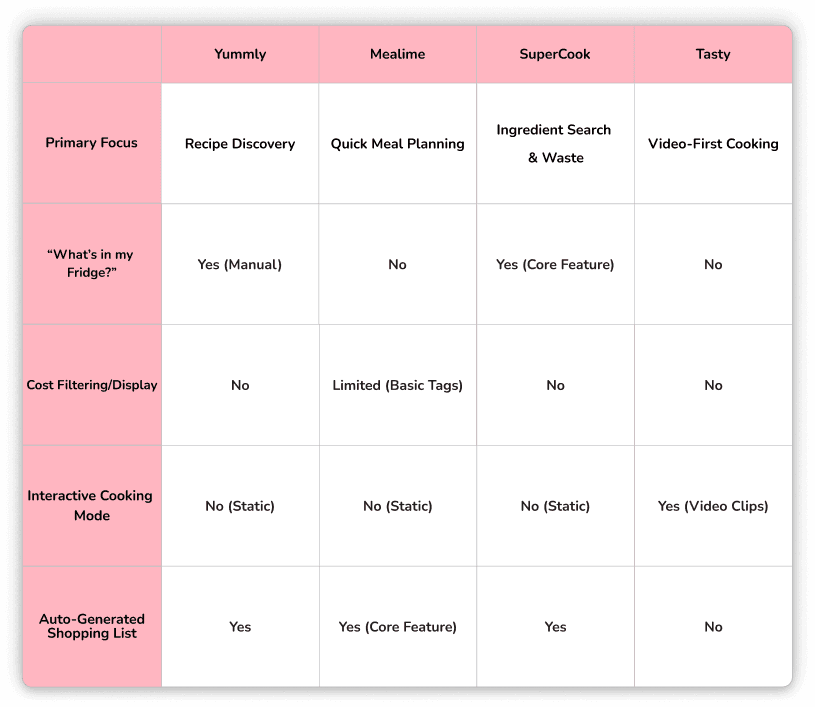
I also completed a competitive audit of four major recipe and cooking apps:
Yummly
Mealime
SuperCook
Tasty
Competitive Audit 👩💻👩💻
🥗 Healthy Intentions vs Reality
72.7% of respondents want to eat healthier
Only 36.4% consider their current habits “healthy”
⏱ Time & Difficulty
36.4% rated cooking as “moderately difficult”
Users cited long prep times and unclear instructions as major deterrents
🥕 Ingredient Waste
Many users buy fresh ingredients but fail to finish them
Users struggle to find recipes that use everything they already have
🧠 Feature Demand
81.8% of users said a “What’s in my fridge?” feature would make cooking significantly easier
While some apps offer ingredient-based searches, they often:
Don’t fully support budget-conscious users
Lack hands-free, beginner-friendly learning modes
This revealed an opportunity to design a solution that prioritizes learning, accessibility, and ingredient efficiency.
Key Takeaways 🔑🔑
‼️Problem‼️
Users want to eat healthier but feel limited by time, budget, and uncertainty around cooking with fresh ingredients.
02 - Problem, Pain Points, "How Might We?"
02 - Problem, Pain Points, "How Might We?"
Cooking is perceived as complicated and intimidating
1
2
Existing tools don’t fully support ingredient reuse
Budget and learning needs are often overlooked
3
Pain Points 😣 😣
"How Might We?"
How might we empower users of all skill levels to cook healthy meals using ingredients they already own—while reducing food waste, saving time, and building confidence in the kitchen?
🧭 Discovery
🧺 Inventory Management
🧺 Inventory Management
🎓 Education & Confidence
🎓 Education & Confidence
🧬 Personalization
03 - Ideation
People struggled with decision fatigue and irrelevant recipes.
Ingredient-based recipe discovery (“What’s in my fridge?”)
Clear recipe readiness indicators (Ready! vs. Needs more items)
Indicators for time and calories
Impact: Faster, more confident meal decisions.
Users frequently wasted fresh ingredients due to lack of visibility
Recipe prioritization based on existing ingredients
Impact: Reduces food waste and unnecessary spending.
Cooking felt intimidating due to unclear instructions.
Step-by-step, hands-free interactive tutorials
Integrated timers and beginner-friendly guidance
Impact: Lowers barriers for novice cooks and increased confidence.
Personalization emerged as essential across all pillars.
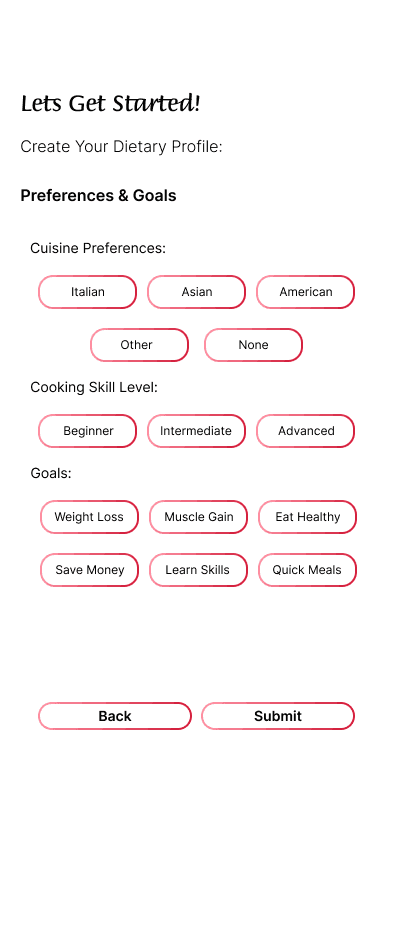
A dietary profile during onboarding capturing preferences, allergies, health considerations, and skill level
Impact: Recommendations that are safe, relevant, and realistic.
Cooking felt intimidating due to unclear instructions.
Step-by-step, hands-free interactive tutorials
Integrated timers and beginner-friendly guidance
Impact: Lowers barriers for novice cooks and increased confidence.
How might we empower users of all skill levels to cook healthy meals using ingredients they already own—while reducing food waste, saving time, and building confidence in the kitchen?
Users frequently wasted fresh ingredients due to lack of visibility
Recipe prioritization based on existing ingredients
Impact: Reduces food waste and unnecessary spending.
04 - Wireframes
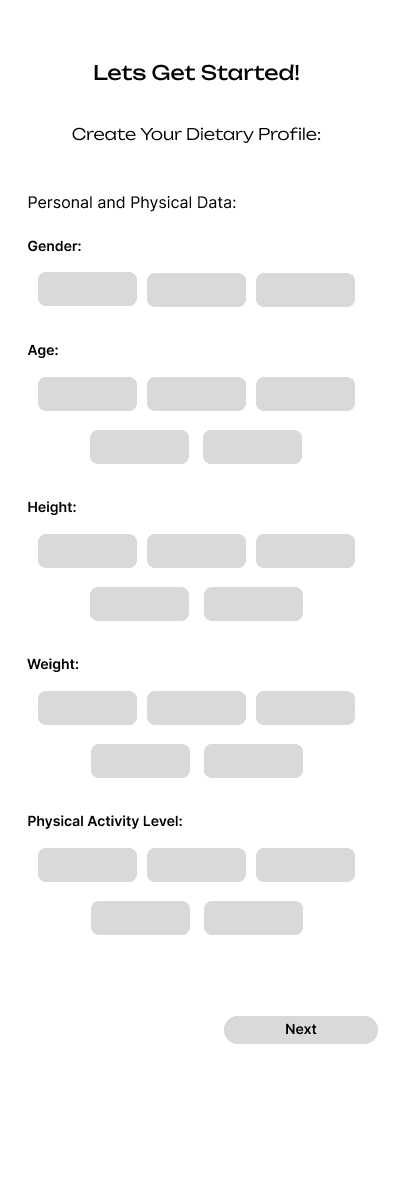
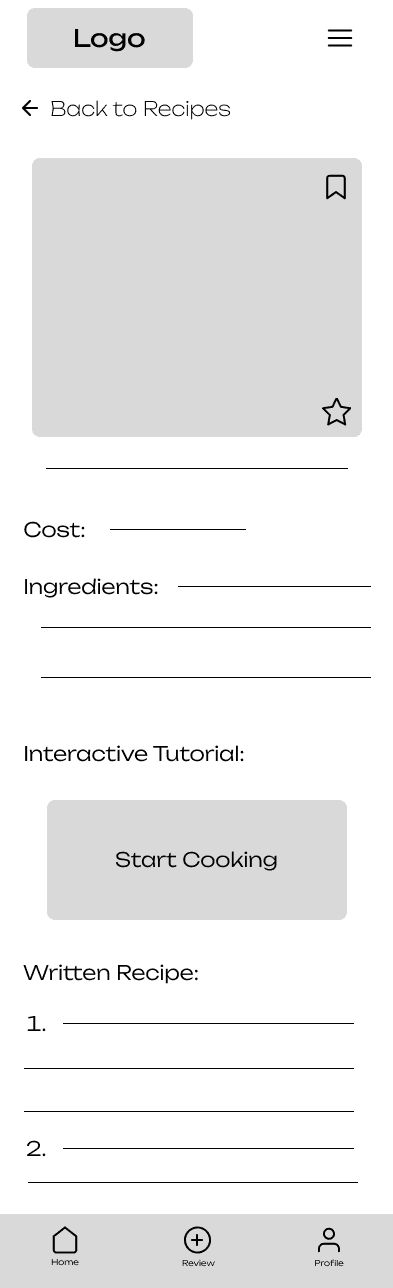
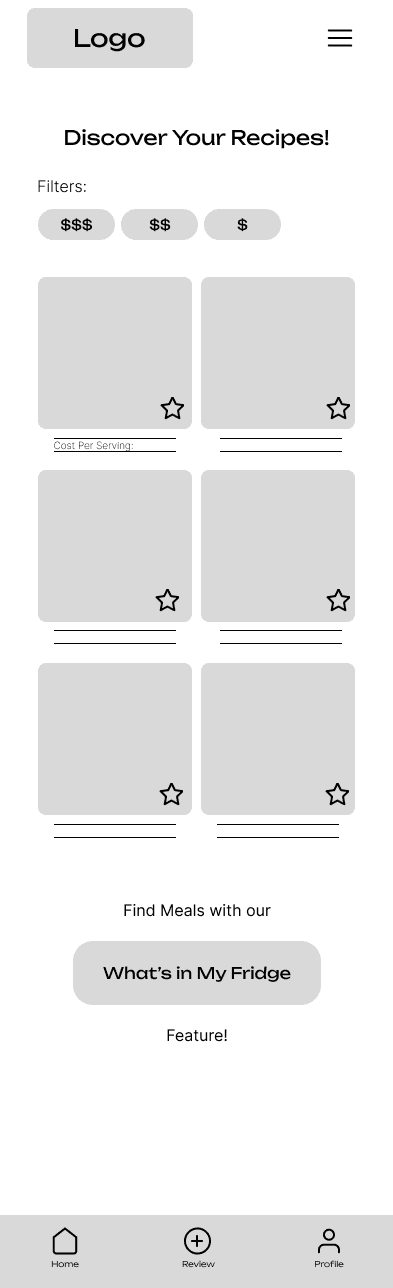
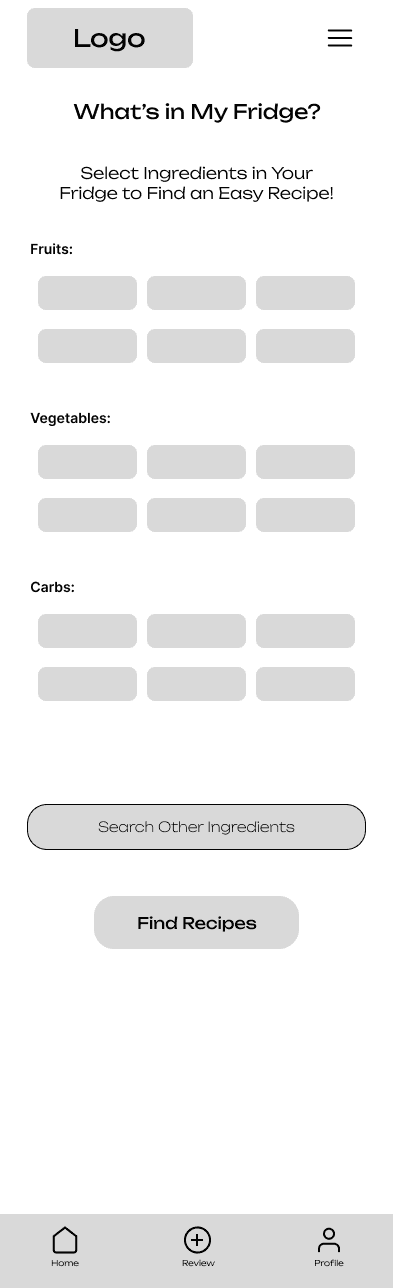
I created low-fidelity wireframes to focus on information hierarchy, task flow, and usability without visual distraction.
The goal was to ensure users could move from ingredients to a completed meal with minimal effort.
Onboarding +
Dietary
Profile
Recipes
Page
"Whats in
My Fridge"
Recipe Card
Lo-Fi Wireframes
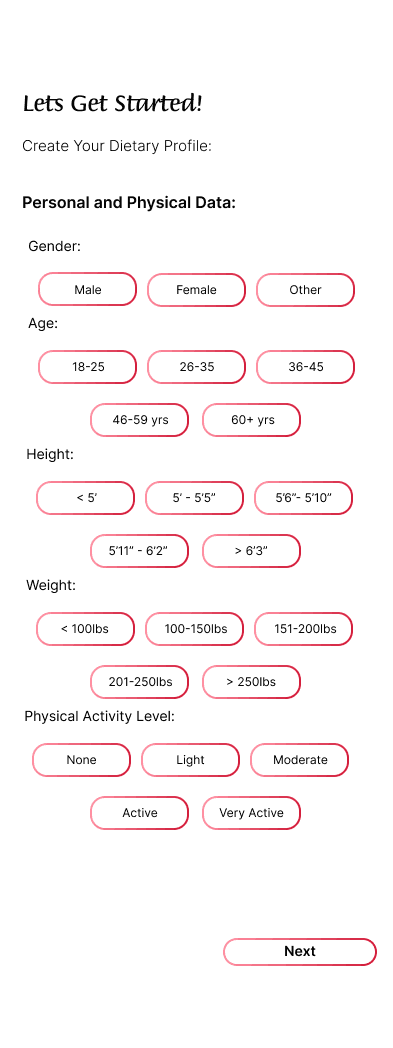
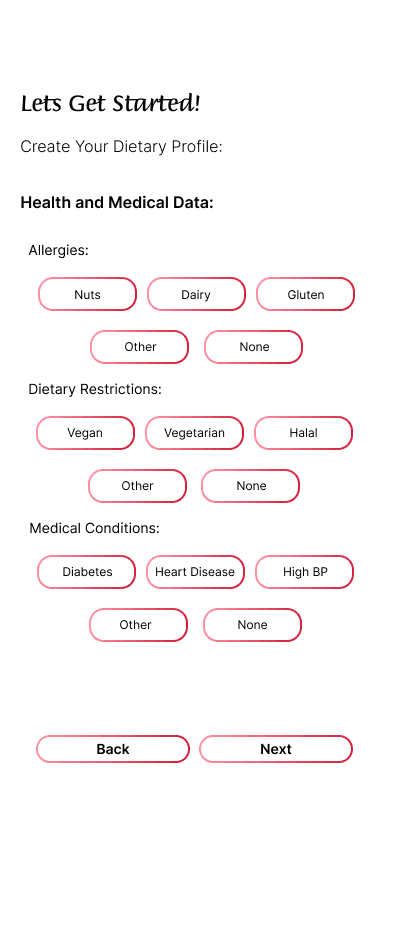
Onboarding + Dietary Profile:
Early wireframe exploring a progressive onboarding flow that captures dietary preferences
allergies, and cooking skill level without overwhelming new users
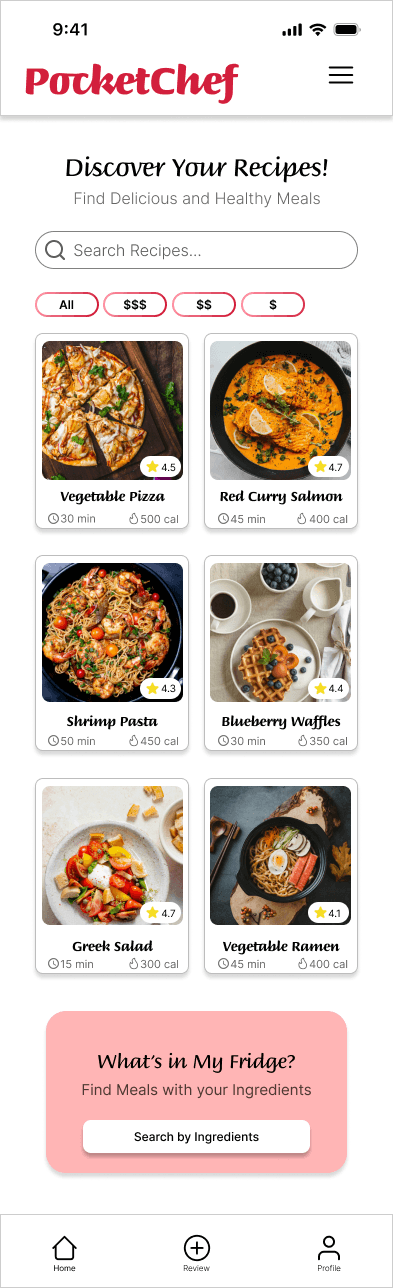
Recipes Page:
Layout exploration prioritizing quick recipe evaluation by surfacing cook time, calories,
and ingredient readiness at a glance
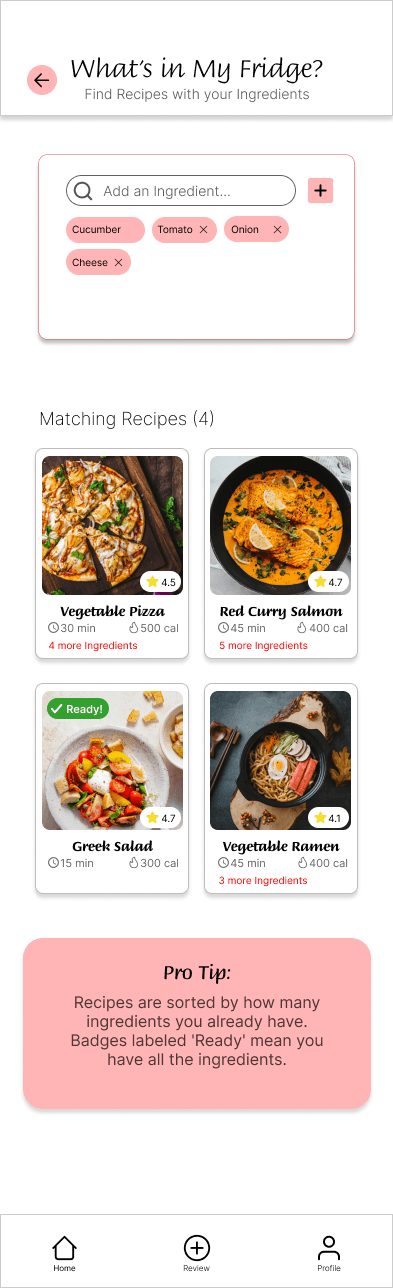
"Whats in My Fridge":
Wireframe designed to make ingredient input fast and low-effort, reinforcing the app’s core
value of cooking with what users already own
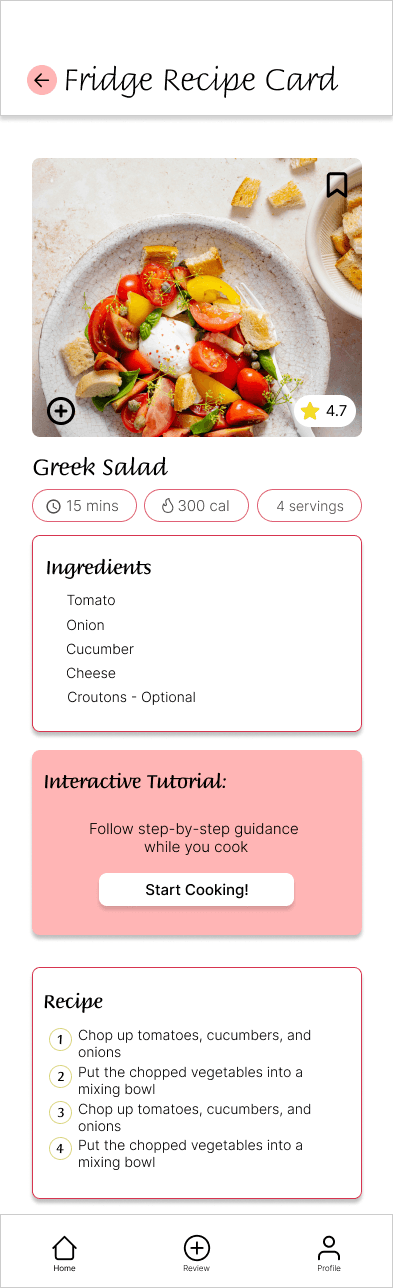
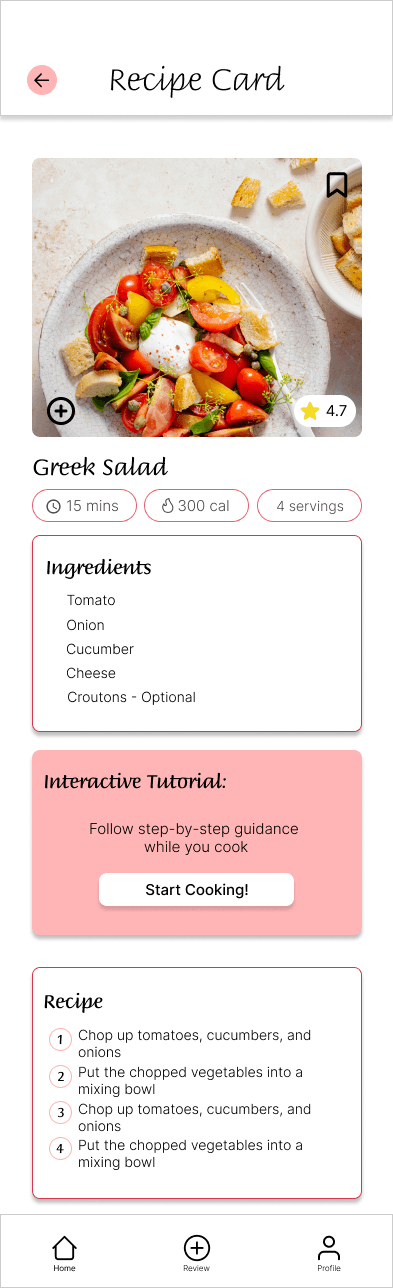
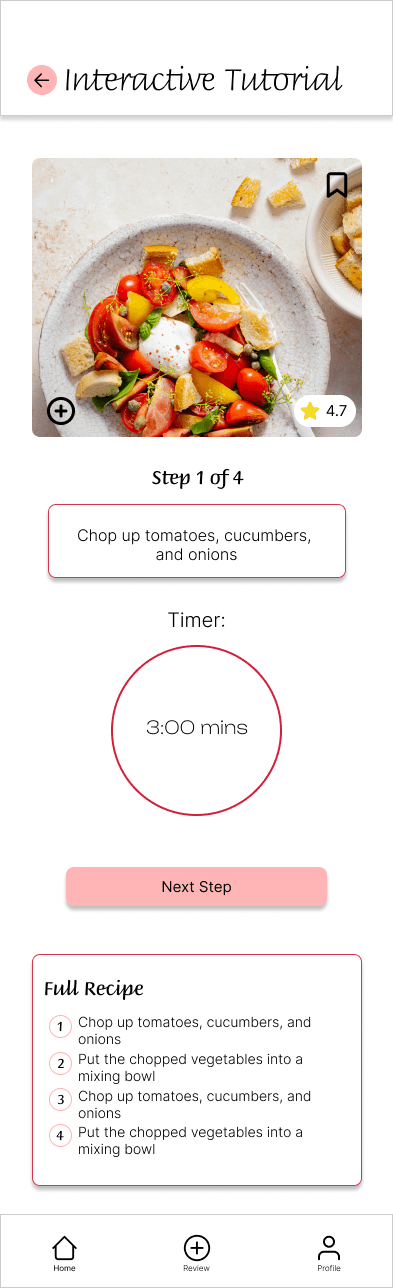
Recipe Card:
Wireframe emphasizing clear recipe details with a prominent entry point into the interactive
tutorial, allowing users to seamlessly transition from planning to guided cooking

Hi-Fi Mockups
05 - Final Product
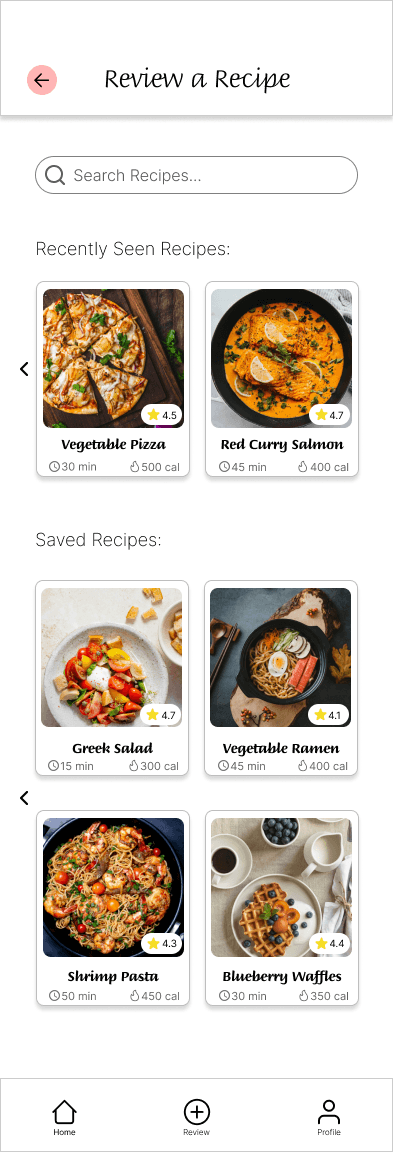
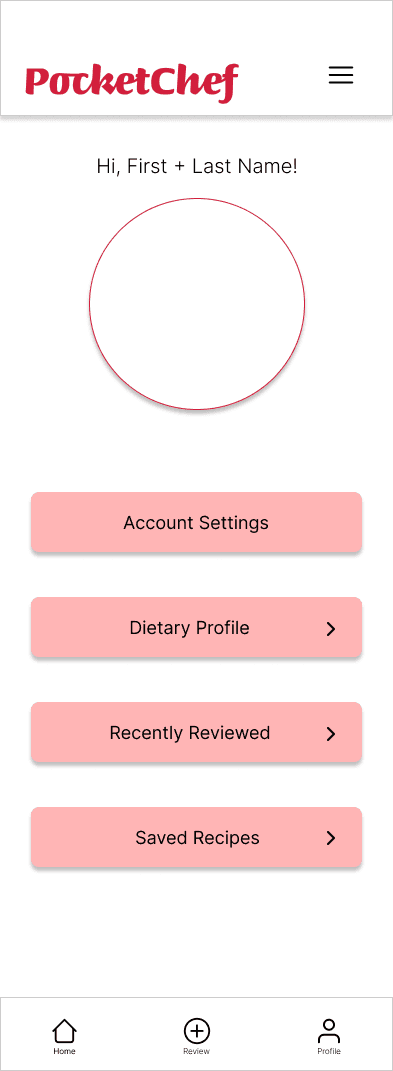
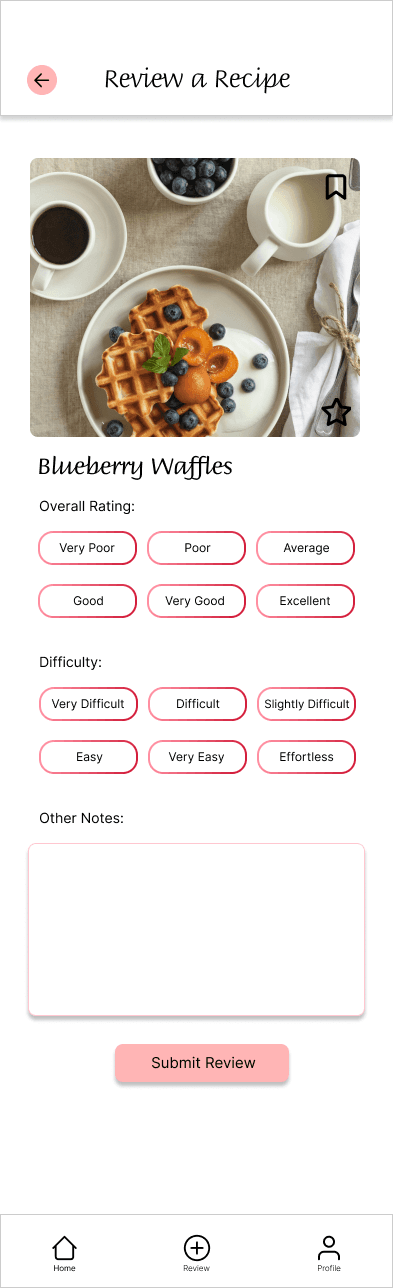
Once the core layout, content hierarchy, and interaction patterns were established in wireframes, I transitioned into high-fidelity designs to focus on visual consistency, accessibility compliance, and creating an approachable, confidence-building cooking experience.
Introducing PocketChef!
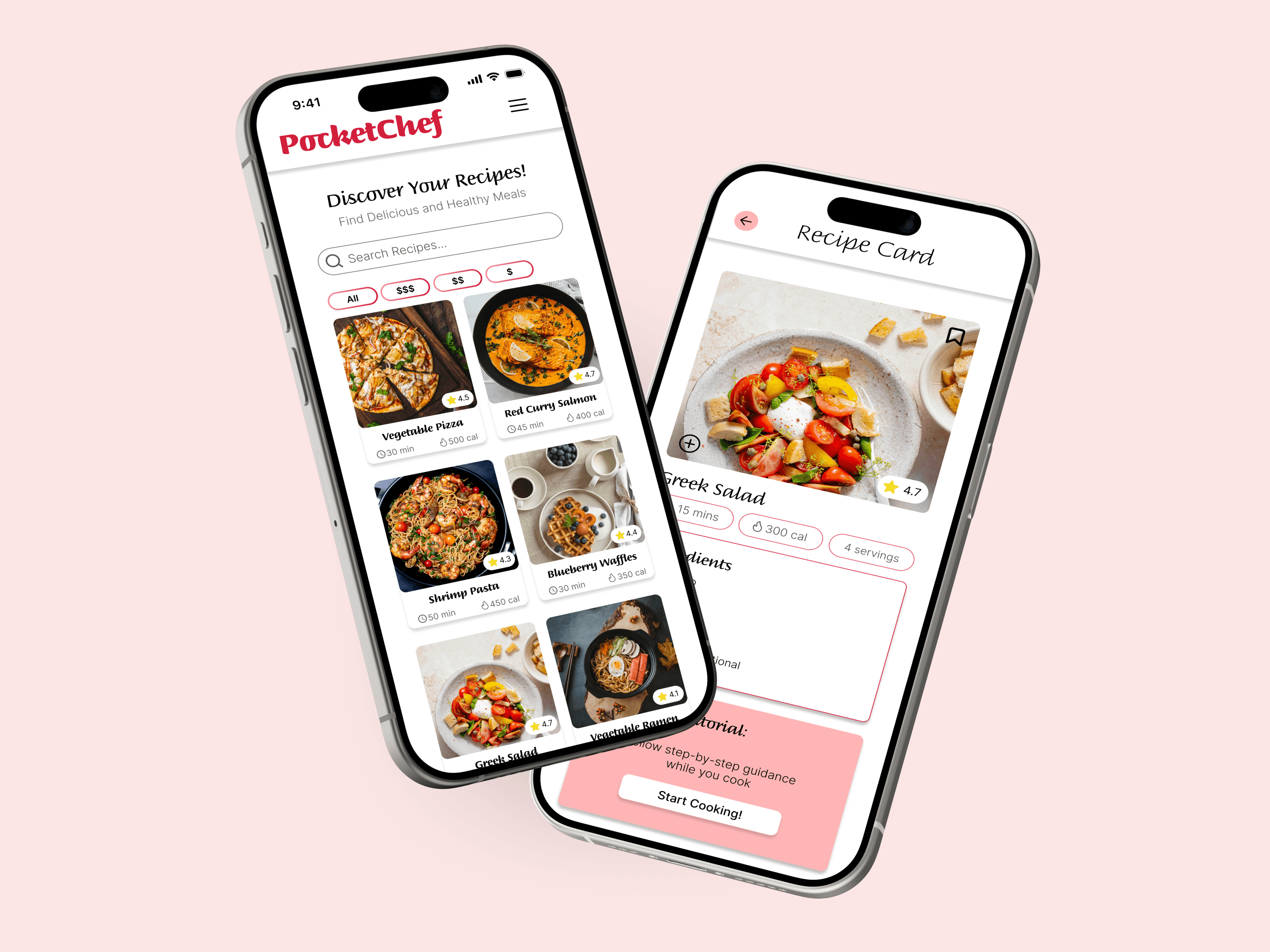
Below are sample screens that illustrate how the final design brings ingredient management, personalized cooking, and interactive learning together in a cohesive mobile experience.
Introducing PocketChef!
Below are sample screens that illustrate how the final design brings ingredient management, personalized cooking, and interactive learning together in a cohesive mobile experience.
The final visual design focuses on warmth, clarity, and approachability—positioning PocketChef as a friendly guide rather than an intimidating cooking tool.
🎨 Color Palette
Dark pinkish reds and lighter pink tones were chosen to evoke warmth and appetite, drawing on visual associations with food and home cooking. Whites and soft greys balance the palette to keep screens light and readable.
✍️ Typography
Cursive-style headers reference classic cookbooks, adding personality and familiarity, while clean body text ensures legibility during active cooking.
♿ Accessibility Refinements
High-contrast color pairings (dark pink tones with white and grey backgrounds) were used to support readability and meet accessibility standards.
🧩 Component Consistency
Reusable components across recipe cards, buttons, and ingredient tags create a cohesive experience and reduce cognitive load.
Visual Design Direction
Conduct high-fidelity usability testing on the interactive tutorial mode
Explore AI-based image recognition to identify ingredients directly from a user’s fridge
Expand dietary personalization for medical and cultural needs
06 - Next Steps
Healthy eating is often framed as a lack of motivation, but my research showed the real barriers are time, budget, unclear guidance, and ingredient waste. For students and young professionals, cooking at home can feel overwhelming even when there’s a strong desire to eat better.
PocketChef is important because it makes healthy cooking feel practical and attainable. By helping users cook with ingredients they already own, the app reduces food waste, lowers cost, and simplifies decision-making. Personalized dietary profiles and interactive tutorials further support users by building confidence and offering guidance that adapts to their needs.
This project highlights how thoughtful UX design can support healthier, more sustainable habits by removing friction from everyday decisions.
07 - Why Does this Project Matter?
To better understand user behaviors and pain points, I conducted primary research through a Google Forms survey with 11 participants.
I also completed a competitive audit of four major recipe and cooking apps:
Yummly
Mealime
SuperCook
Tasty
🥗 Healthy Intentions vs Reality
72.7% of respondents want to eat healthier
Only 36.4% consider their current habits “healthy”
⏱ Time & Difficulty
36.4% rated cooking as “moderately difficult”
Users cited long prep times and unclear instructions as major deterrents
🥕 Ingredient Waste
Many users buy fresh ingredients but fail to finish them
Users struggle to find recipes that use everything they already have
🧠 Feature Demand
81.8% of users said a “What’s in my fridge?” feature would make cooking significantly easier
While some apps offer ingredient-based searches, they often:
Don’t fully support budget-conscious users
Lack hands-free, beginner-friendly learning modes
This revealed an opportunity to design a solution that prioritizes learning, accessibility, and ingredient efficiency.
2
Existing tools don’t fully support ingredient reuse
Budget and learning needs are often overlooked
3
The final visual design focuses on warmth, clarity, and approachability—positioning PocketChef as a friendly guide rather than an intimidating cooking tool.
🎨 Color Palette
Dark pinkish reds and lighter pink tones were chosen to evoke warmth and appetite, drawing on visual associations with food and home cooking. Whites and soft greys balance the palette to keep screens light and readable.
✍️ Typography
Cursive-style headers reference classic cookbooks, adding personality and familiarity, while clean body text ensures legibility during active cooking.
♿ Accessibility Refinements
High-contrast color pairings (dark pink tones with white and grey backgrounds) were used to support readability and meet accessibility standards.
🧩 Component Consistency
Reusable components across recipe cards, buttons, and ingredient tags create a cohesive experience and reduce cognitive load.
Conduct high-fidelity usability testing on the interactive tutorial mode
Explore AI-based image recognition to identify ingredients directly from a user’s fridge
Expand dietary personalization for medical and cultural needs
Healthy eating is often framed as a lack of motivation, but my research showed the real barriers are time, budget, unclear guidance, and ingredient waste. For students and young professionals, cooking at home can feel overwhelming even when there’s a strong desire to eat better.
PocketChef is important because it makes healthy cooking feel practical and attainable. By helping users cook with ingredients they already own, the app reduces food waste, lowers cost, and simplifies decision-making. Personalized dietary profiles and interactive tutorials further support users by building confidence and offering guidance that adapts to their needs.
This project highlights how thoughtful UX design can support healthier, more sustainable habits by removing friction from everyday decisions.
But, how did I figure this out?